Summary: in this tutorial, you will learn about the Oracle CHAR data type which is a fixed-length character string type.
Introduction to Oracle CHAR data type #
The Oracle CHAR data type allows you to store fixed-length character strings. The CHAR data type can store a character string with a size from 1 to 2000 bytes.
To define a CHAR column, you need to specify a string length either in bytes or characters as shown following:
CHAR(length BYTE)
CHAR(length CHAR)Code language: SQL (Structured Query Language) (sql)If you don’t explicitly specify BYTE or CHAR followed the length, Oracle uses the BYTE by default.
The default value of length is 1 if you skip it like the following example:
column_name CHARCode language: SQL (Structured Query Language) (sql)When you insert or update a fixed-length character string column, Oracle stores the characters as the fixed-length data.
It means that if you store a value whose length is less than the maximum length defined in the column, Oracle pads the spaces to the character string up to the maximum length.
If you insert a value whose length is larger than the column, Oracle returns an error.
Oracle uses blank-padded comparison semantics for comparing CHAR values.
Oracle CHAR data type examples #
Let’s take a look at some examples to understand how the CHAR data type works.
Space usage example #
First, create a new table named t that consists of a CHAR column (x) and VARCHAR2 column (y). The length of each column is 10 bytes.
CREATE TABLE t (
    x CHAR(10),
    y VARCHAR2(10)
);Code language: SQL (Structured Query Language) (sql)
Second, insert a new row into the t table with the same data for both x and y columns:
INSERT INTO
  t (x, y)
VALUES
  ('Oracle', 'Oracle');Code language: SQL (Structured Query Language) (sql)
Third, verify the insert by using the following query:
SELECT
  *
FROM
  t;Code language: SQL (Structured Query Language) (sql)
The following statement retrieves data from the t table:
SELECT
  x,
  DUMP (x),
  y,
  DUMP (y)
FROM
  t;Code language: SQL (Structured Query Language) (sql)
In this example, we used the DUMP()x and y columns:
The string Oracle takes 6 bytes. However, Oracle padded 4 more spaces on the right of the string to make its length 10 bytes for the x column. It is not the case for the y column because the data type of y column is a variable-length character string (VARCHAR2).
It is more clear if you use the LENGTHB()x and y columns:
SELECT
    LENGTHB(x),
    LENGTHB(y)
FROM
    t;
Code language: SQL (Structured Query Language) (sql)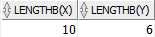
Characters comparison example #
The following statements return the same result:
SELECT * FROM t WHERE x = 'Oracle';
SELECT * FROM t WHERE y = 'Oracle';Code language: SQL (Structured Query Language) (sql)
However, if you use bind variables, the effect is different. Consider the following example:
variable v varchar2(10);
exec :v := 'Oracle';Code language: SQL (Structured Query Language) (sql)
In this example, we declare v as a bind variable with the VARCHAR2 data type.
Now, we use v as an input to compare against the x column:
select * from t where x = :v;Code language: SQL (Structured Query Language) (sql)The statement returned an empty result set.
The following query uses the v variable to compare with the y column:
select * from t where y = :v;Code language: SQL (Structured Query Language) (sql)It returned a row as expected.
This is because when comparing the string of character types with unequal length, Oracle uses non-blank-padding semantics.
To make it work, you need to use the RTRIM() function to strip spaces from the CHAR data before comparing it with the input string as follows:
select * from t where rtrim(x) = :v;Code language: SQL (Structured Query Language) (sql)Summary #
- Use Oracle
CHARdata type to store fixed length strings in the database.

