
The Python Assignment Operators are handy for assigning the values to the declared variables. Equals (=) is the most commonly used assignment operator in any programming language. For example:
i = 10
The list of available assignment operators in Python language.
| Assignment Operators | Example | Explanation |
|---|---|---|
| = | x= 25 | Value 25 is assigned to x |
| += | x += 25 | This is same as x = x + 25 |
| -= | x -= 25 | Same as x = x – 25 |
| *= | x *= 25 | This is same as x = x * 25 |
| /= | x /= 25 | Same as x = x / 25 |
| %= | x %= 25 | This is identical to x = x % 25 |
| //= | x //= 25 | Same as x = x // 25 |
| **= | x **= 25 | This is same as x = x ** 25 |
| &= | x &= 25 | This is same as x = x & 25 |
| |= | x |= 25 | This is same as x = x | 25 |
| ^= | x ^= 25 | Same as x = x ^ 25 |
| <<= | x <<= 25 | This is same as x = x << 25 |
| >>= | x >>= 25 | Same as x = x >> 25 |
Python Assignment Operators Example
For this example, we are using four variables: a, Total, x, and y; their values are 7, 21, 9, and 65. Next, we use them to show the working functionality of all the Assignment Operators.
a = 7
Total = 21

Total += a # Using +=
print("The Value of the Total after using += is: ", Total)
Total -= a # Using -=
print("The Value of the Total after using -= is: ", Total)
Total *= a # Using *=
print("The Value of the Total after using *= is: ", Total)
Total //= a # Using //=
print("The Value of the Total after using //= is: ", Total)
Total **= a # Using **=
print("The Value of the Total after using **= is: ", Total)
Total /= a # Using /=
print("The Value of the Total after using /= is: ", Total)
Total %= a # Using %=
print("The Value of the Total after using %= is: ", Total)

x = 9
y = 65
x &= y # Using &=
print("The Value of the x after using &= is: ", x)
x |= 9 # Using |=
print("The Value of the x after using |= is: ", x)
x ^= y # Using ^=
print("The Value of the x after using ^= is: ", x)
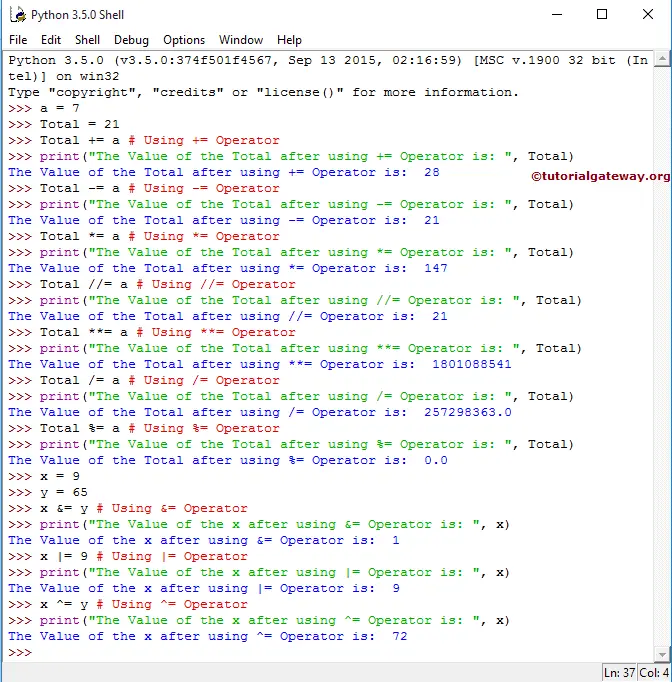
In this example program, We declared 2 integer values, a Total, and we assigned values 7 and 21, respectively.
The print statements will display the output of the Total after using the Python Assignment Operators on a and Total. Let us see the functionalities of all of them.
First functionality,
 Total += a # Using +=
 print("The Value of the Total after using += is: ", Total)
Total += a means
Total = Total + a ⇒ 21 + 7 = 28
So, the output of the above-mentioned Python print statement will be 28
The functionality of the Second assignment operator is,
 Total -= a # Using -=
 print("The Value of the Total after using -= is: ", Total)
Total -= a means
Total = Total – a ⇒ 28 – 7 = 21
So, the output will be 21
Third functionality,
 Total *= a # Using *=
 print("The Value of the Total after using *= is: ", Total)
Total *= a means
Total = Total * a ⇒ 21 * 7 = 147
So, the output will be 147
Fourth assignment operator in Python functionality,
 Total //= a # Using //=
 print("The Value of the Total after using //= is: ", Total)
Total //= a means
Total = Total // a ⇒ 147 // 7 = 21
So, the output of the above-mentioned print statement will be 21
Fifth functionality,
 Total **= a # Using **=
 print("The Value of the Total after using **= is: ", Total)
Total **= a means
Total = Total ** a ⇒ 21*21*21 *21*21*21*21 = 1,801,088,541
So, the output of the above-mentioned print statement will be 1,801,088,541
The Sixth assignment operator functionality,
Total /= a # Using /=
>>> print("The Value of the Total after using /= is: ", Total)
Total /= a means
Total= Total/ a ⇒ 1,801,088,541 / 7 = 257,298,363
So, the output of Total /= a will be 257,298,363
The functionality of a Seventh assignment operator in Python is
 Total %= a # Using %=
 print("The Value of the Total after using %= is: ", Total)
Total %= a means
Total = Total % a ⇒257,298,363 % 7 = 0 (because Remainder of 257,298,363 /7 is = 0)
In the next line, We declared 2 integer values, x and y, and assigned 9 and 65, respectively.
 x = 9
 y = 65
Eighth functionality,
 x &= y # Using &=
 print("The Value of the x after using &=  is: ", x)
x &= y means
x = x&y ⇒ 9 & 65
⇒ 00001001 & 01000001 = 00000001 ⇒ 1
So, the output of x &= y is 1. Please refer Bitwise
Ninth one’s functionality,
 x |= 9 # Using |=
 print("The Value of the x after using |=  is: ", x)
x |= 9 means x | 9 ⇒ 1 | 9
⇒ 00000001 | 00001001 = 00001001 ⇒ 9
So, the output will be 9
The functionality of a Tenth assignment operator,
x ^= y # Using ^=
>>> print("The Value of the x after using ^= is: ", x)
x ^= y means
x = x ^ y ⇒ 9 ^65
⇒ 00001001 ^ 01000001 = 01001000 ⇒ 72
So, the output will be 72.